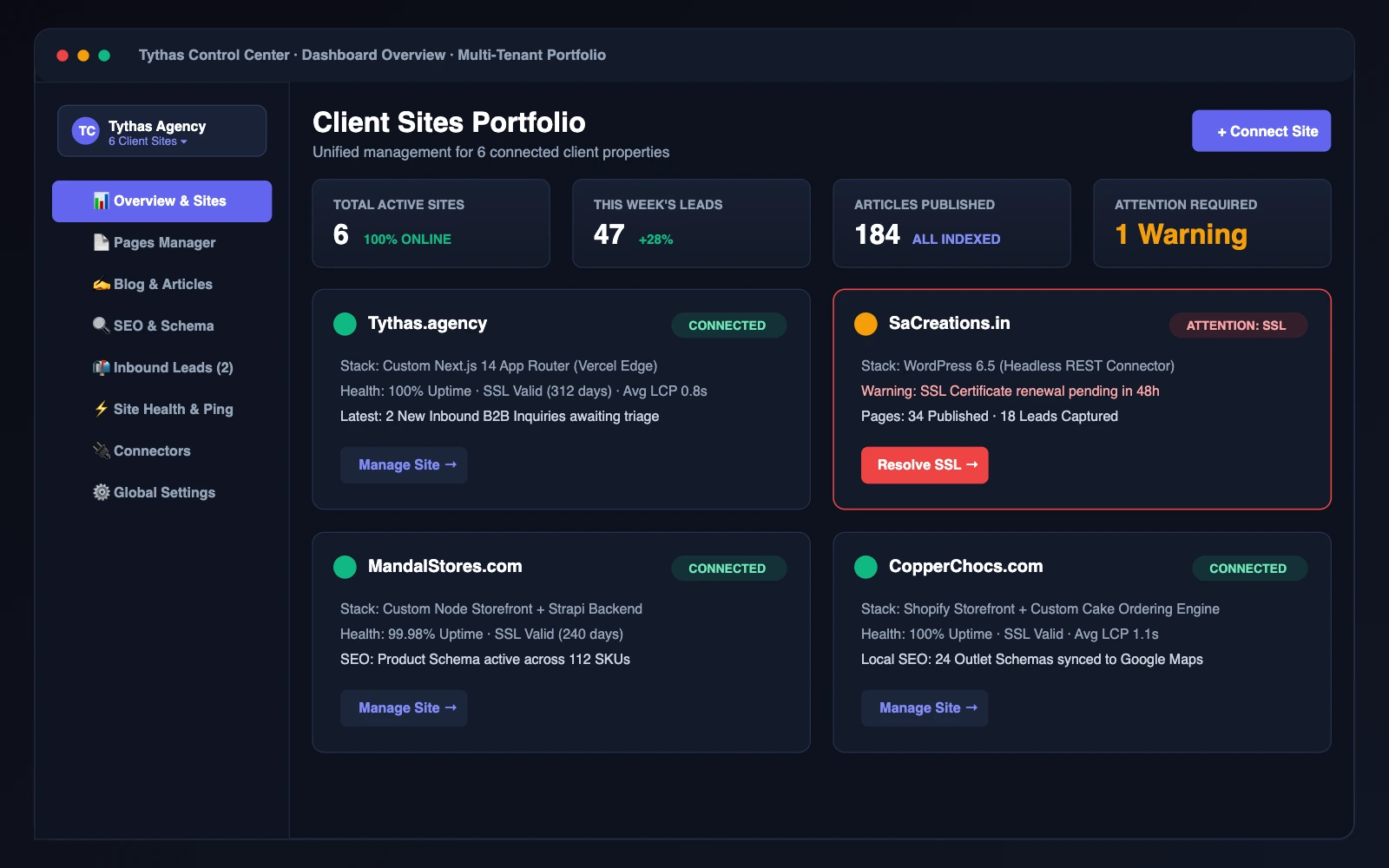
Tythas Control Center

Designing one dashboard to run every client website

A multi-tenant website management platform that replaces fragmented client logins with one central dashboard for CMS, SEO, leads, and uptime.

Role
Lead Product Designer & Design Engineer
Team
Solo — design, front-end and integration
Timeline
2026
Platform
B2B SaaS (Multi-tenant web platform)
Outcome
6 → 1 dashboard consolidation · 0 dev tickets needed
Status
Live for 6 client websites; production migration in progress
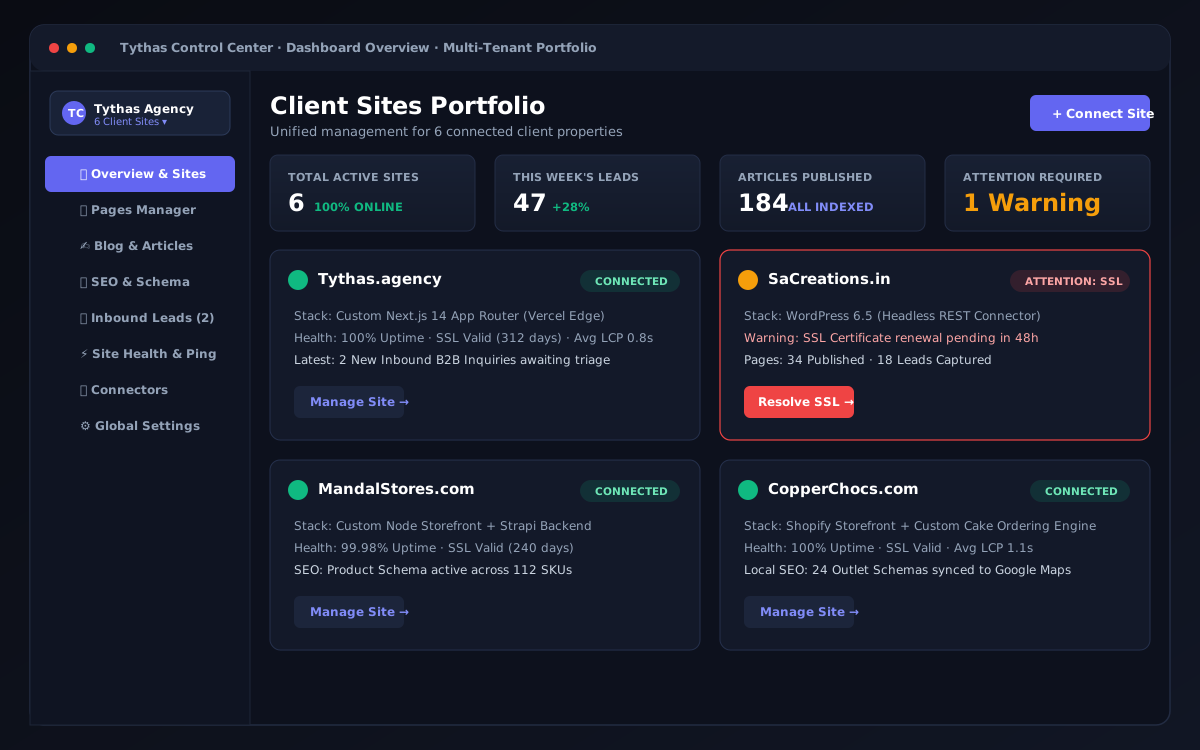
Tythas Control Center — Multi-Tenant Web Platform Architecture and UI Showcase

Overview

TL;DR · KEY OUTCOME

Consolidated 6 client site workflows into 1 unified dashboard, cutting developer intervention on routine updates to zero.

The problem

The moment a client site shipped, it became its own disconnected island — a separate WordPress admin, a different hosting cPanel, sometimes an ad-hoc script written once and never documented.

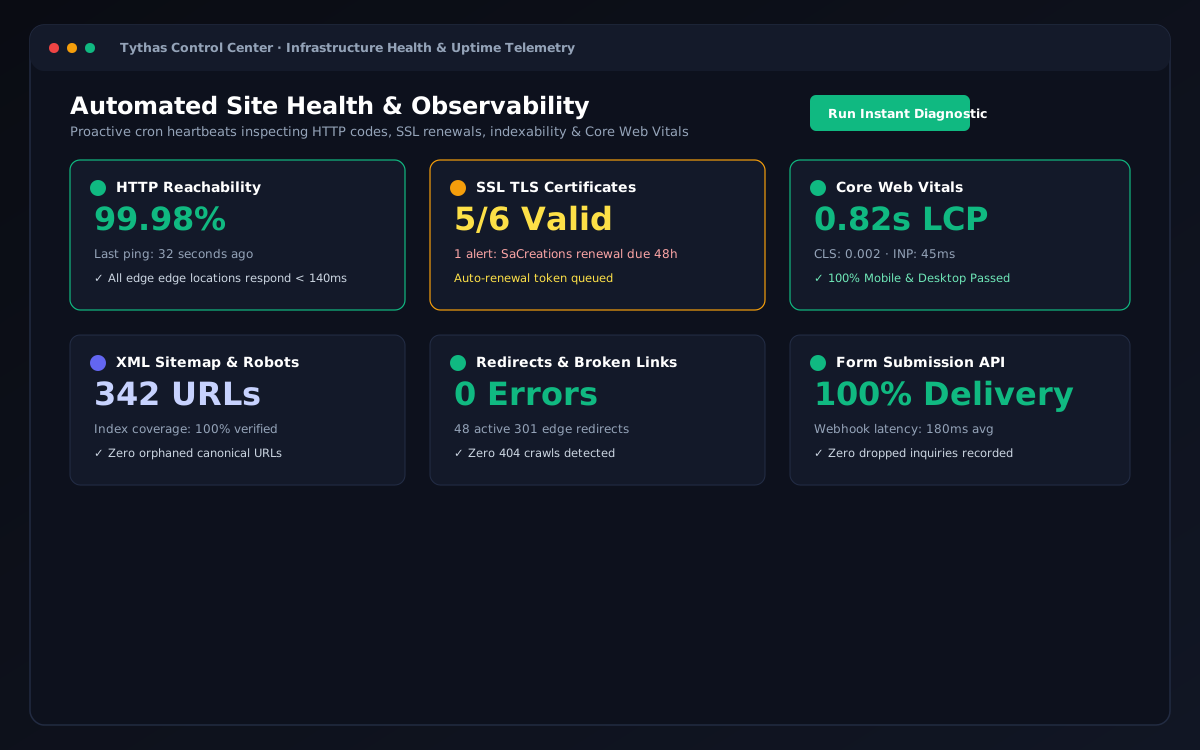
There was no single place to see which sites needed attention, no consistent way to publish a page across different tech stacks, and nothing watching for SEO gaps, lead capture failures, or server uptime.

A five-minute copy change became an urgent developer ticket for me personally, and more than once I learned about a broken form or expired SSL certificate directly from the client — not from an automated system.

"A five-minute content change often became an urgent ticket for me personally, and more than once I heard about an expired SSL directly from the client."

Challenge

My role and scope

Here is how ownership was partitioned across product architecture, interface design, and client operational constraints:

What I owned

  • Product architecture, information architecture, and end-to-end design system tokens
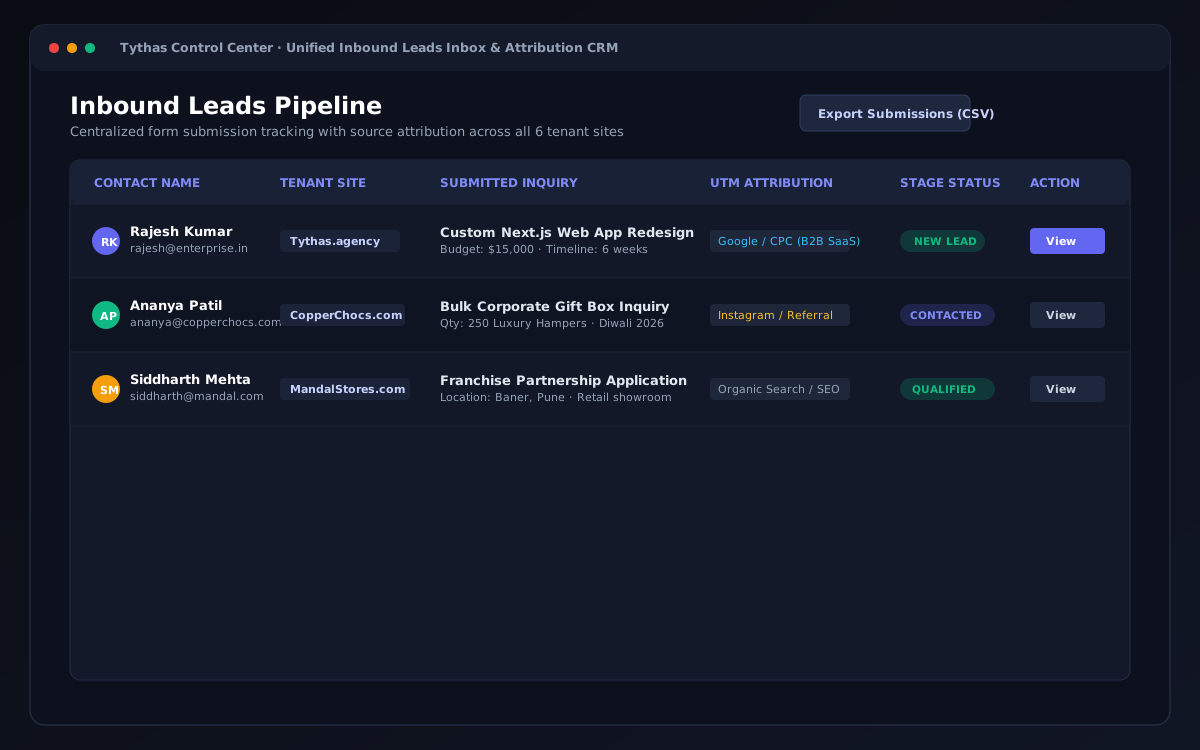
  • Interactive UX workflows: WYSIWYG editor, schema generator, unified leads CRM, and health telemetry
  • Front-end engineering in Next.js 14, React, Tailwind CSS, and edge API integration
  • Defensive state machine logic preventing unverified writes to client repositories

What others owned / constraints

  • Legacy WordPress client hosting environments and DNS configurations
  • Third-party marketing ad campaigns generating inbound client traffic

Approach

Key architectural decisions

Every core interaction was architected through rigorous evaluation of cognitive trade-offs, defensive failure states, and operator ergonomics.

DECISION 01

Universal Connector Bridge vs. Bespoke Client Plugins

Options considered

Considered writing bespoke WordPress plugins per client repo, or forcing all clients into a rigid headless CMS migration with high maintenance overhead.

What I chose and why

Engineered a universal decoupled connector bridge. Abstracted WordPress REST APIs and Next.js server webhooks behind a single capability layer so operators never need to know the underlying stack.
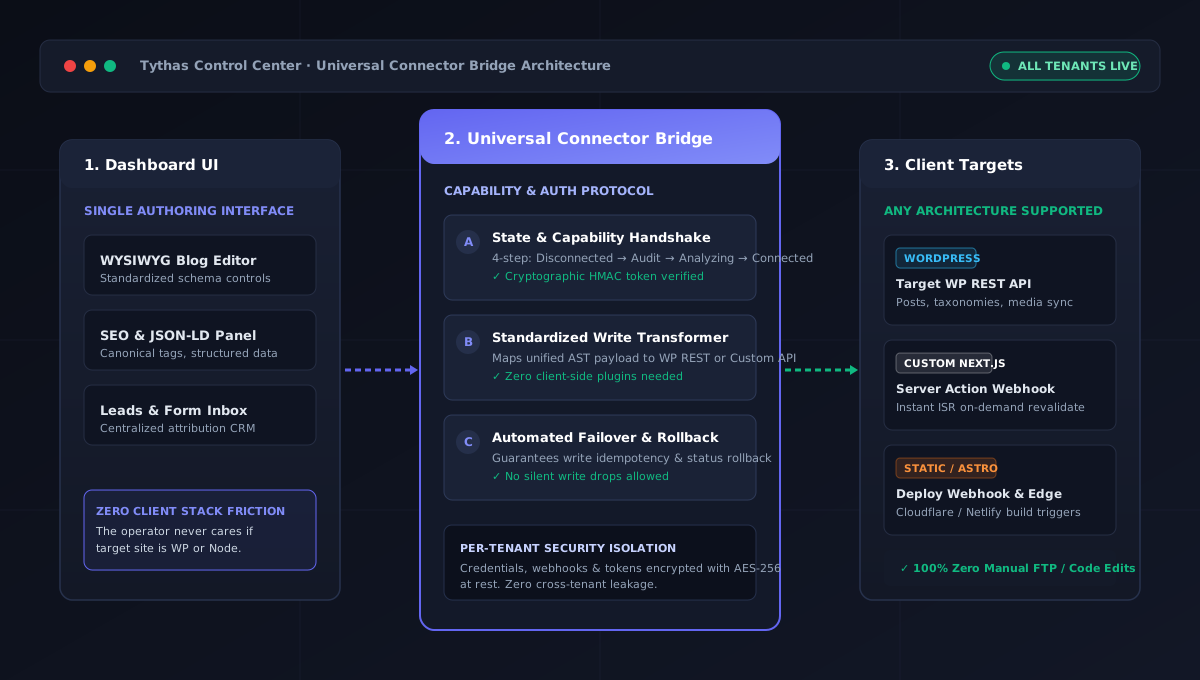
Universal Connector Bridge Architecture Diagram
1

Unified Dashboard Surface

One consistent authoring UI regardless of target CMS or custom framework.

2

Decoupled Capability Handshake

Verifies read/write permissions before unlocking any publishing controls.

3

Multi-Stack Client Targets

Directly bridges to WordPress, Next.js, and static webhooks without client plugins.
DECISION 02

Continuous WYSIWYG Ergonomics vs. Block-Picker Friction

Options considered

Built an experimental Notion-style block editor with nested slash commands and floating inspector panels.

What I chose and why

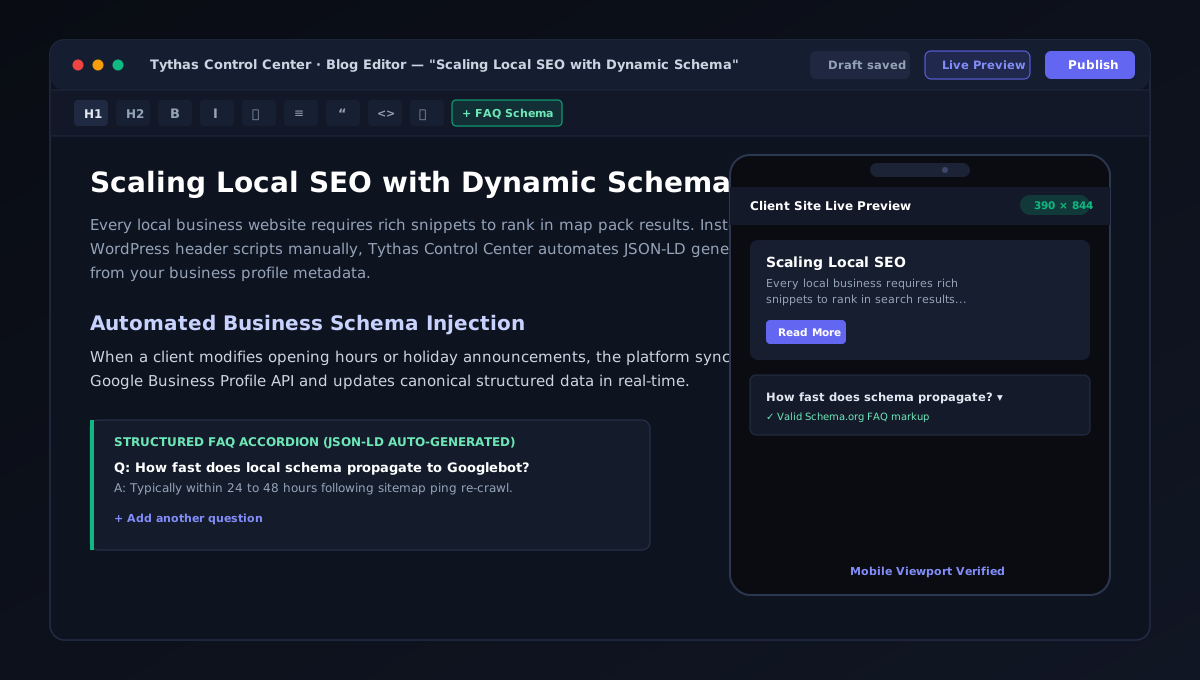
Client testing revealed immediate friction ('We just need a writing box like classic WordPress'). Grounded in Jakob's Law, I pivoted to a continuous writing canvas with 10 persistent top-level tools and instant mobile viewport emulation.

Continuous WYSIWYG Editor with Live Mobile Viewport Emulation
1

10-Icon Persistent Toolbar

Essential formatting visible without digging through nested block menus (Hick's Law).

2

Inline Structured FAQ Accordion

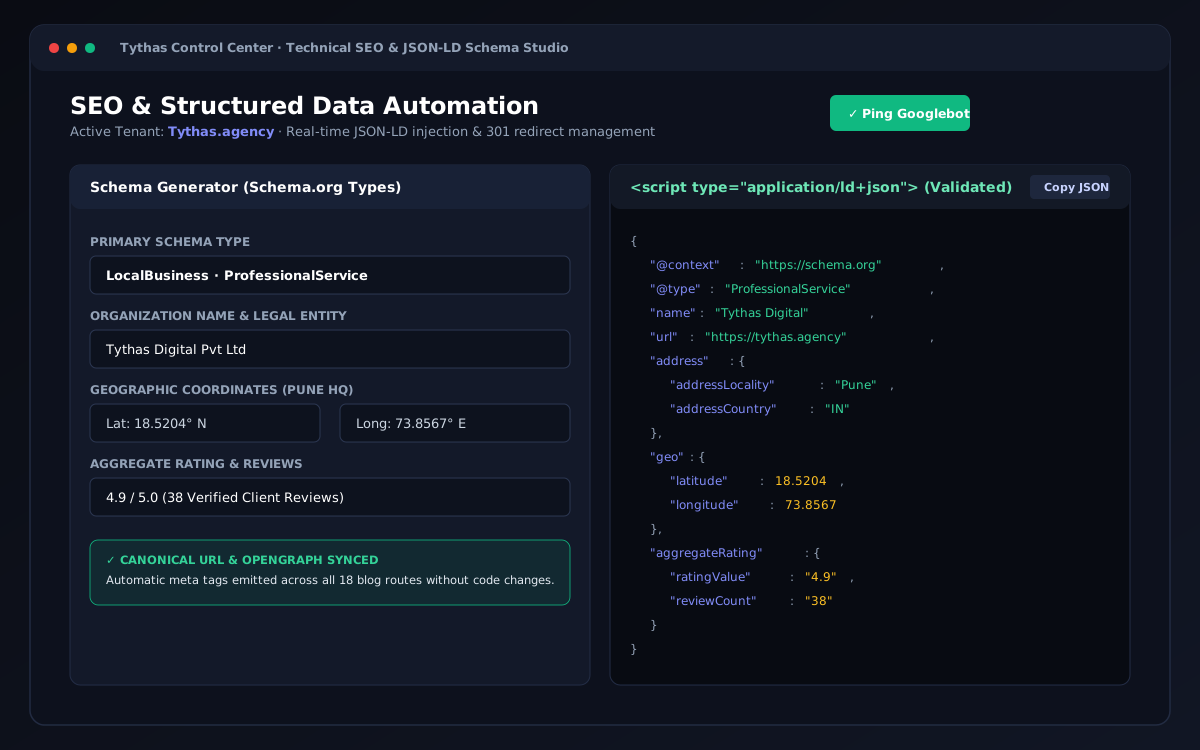
Writing copy automatically outputs valid Schema.org JSON-LD structured data.

3

Instant Mobile Viewport Emulation

390x844 responsive preview updates in real-time as content is drafted.

DECISION 03

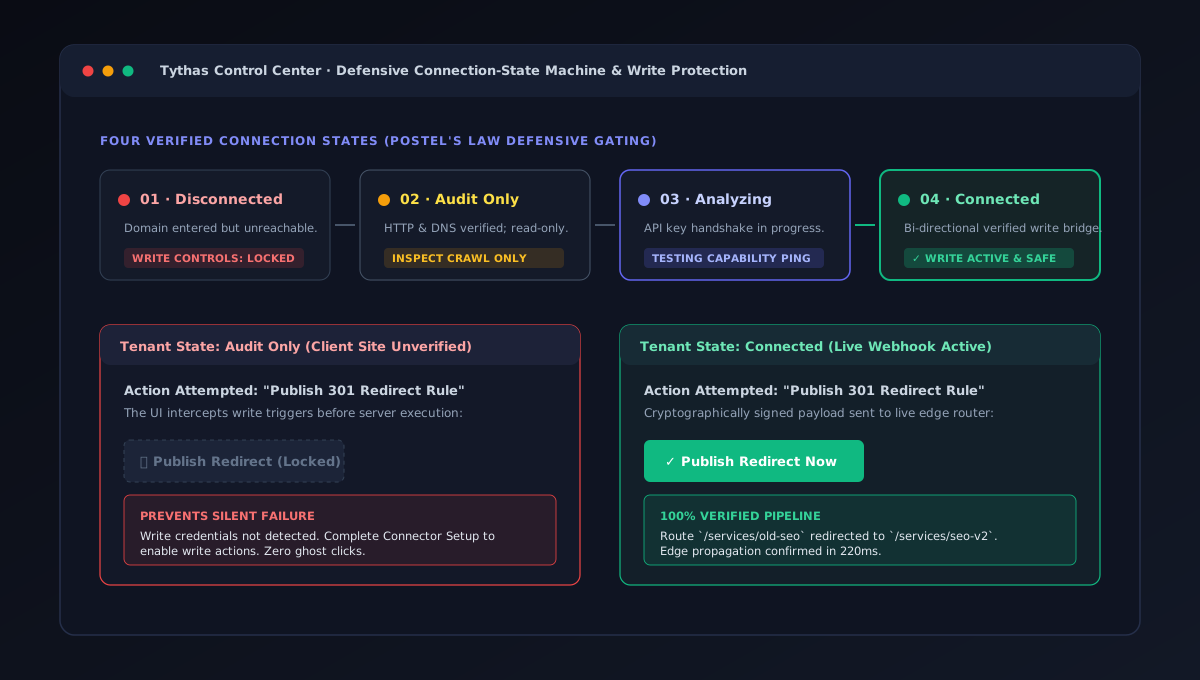
Connection-State Gating for Defensive Operations

Options considered

Considered optimistic UI where publish buttons are always active, displaying error toasts only after network failure.

What I chose and why

Adopted strict 4-state connection gating (Disconnected → Audit Only → Analyzing → Connected). Grounded in Postel's Law and Error Prevention: write actions are physically disabled until the bridge verifies live API authenticity.

Defensive Connection-State Machine and Write Protection
1

4-Phase Verification Machine

Sites progress systematically through verified capability states before write access.

2

Gated Write Interception

Locked state disables destructive buttons with clear guidance preventing ghost clicks.

3

Verified Edge Execution

Live buttons unlock only when cryptographically signed webhooks are confirmed.

DECISION 04

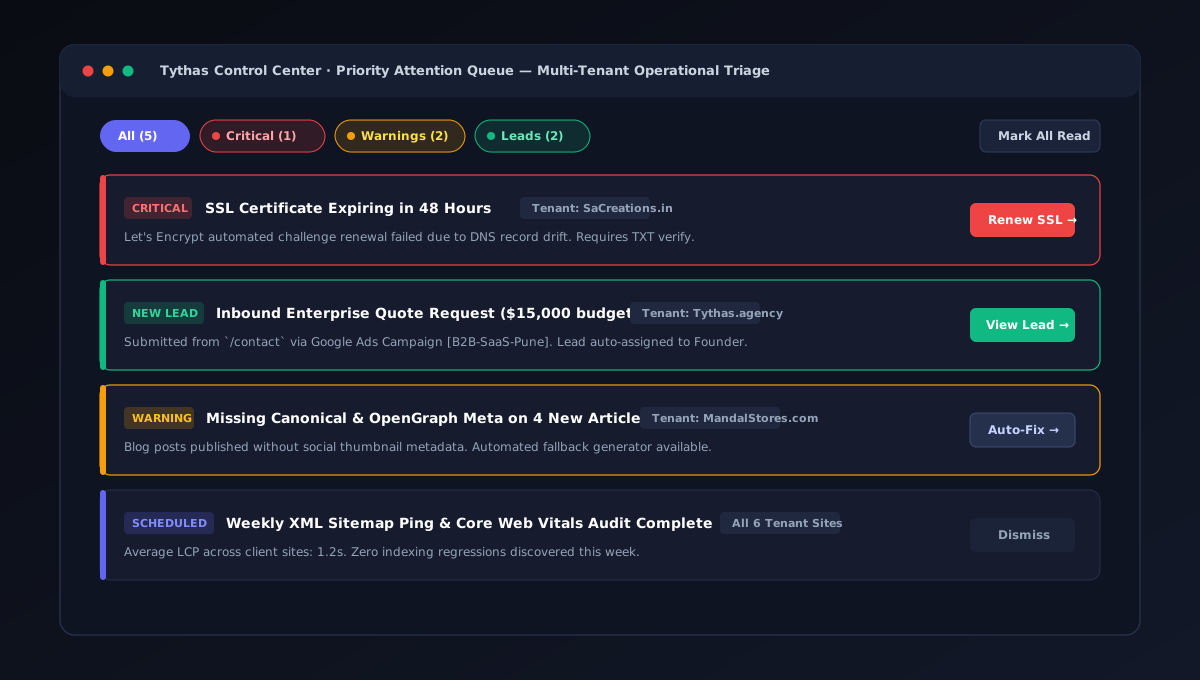
Single Attention Queue vs. Distributed Notification Feeds

Options considered

Considered keeping notifications isolated within their respective tabs (CMS tab, SEO tab, Uptime tab) or relying on email alerts.

What I chose and why

Aggregated all high-priority operational signals across every client domain into one centralized Priority Attention Queue, sorted by severity (Critical, Warning, Leads).

Priority Attention Queue Multi-Tenant Operational Triage
1

Severity-Based Filtering

Immediate triage tabs for Critical outages, Warnings, and Inbound Leads.

2

Cross-Tenant Domain Attribution

Clear badges designate which client property requires operational intervention.

3

One-Click Direct Action

Direct deep-links allow immediate renewal or response without switching contexts.

Outcome

6 → 1 Six client websites managed from one dashboard instead of separate admins
0 No developer needed for routine copy updates since launch
4-state Connection check before any publish (Disconnected → Audit only → Analyzing → Connected)
0.8s Average Largest Contentful Paint across the managed sites (measured with PageSpeed Insights)

How I measured this: Measured on the 6 client sites running on the platform, comparing before and after the move to Control Center.

What I learned

Testing beat my assumptions. I built a Notion-style block editor because it felt modern, but clients wanted a simple writing box. Switching early saved the product. I also learned that designing the states between screens (not connected, analyzing, error) matters as much as the screens themselves.

What I'd do next

  • Complete Phase 8 production migration on Vercel Edge with automated PostgreSQL connection pooling.
  • Expand connector adapter library to support Shopify Storefront API and Webflow webhooks natively.
  • Introduce AI-powered meta description and alt-text generator with human-in-the-loop review.

Artefacts

Process artefacts & research frameworks (4)

User Personas & Needs Hierarchy (Platform Admin vs Content Manager)

Platform Admin (Digambar)

Primary Role: Solo designer & developer running multi-tenant client sites.

Needs Hierarchy: Foundational uptime > Safety (no destructive actions without backend verification) > Belonging (all clients conform to one mental model) > Growth (scale without adding headcount).

Content Manager

Primary Role: Marketing operator / client collaborator.

Core Requirement: Draft articles and review leads on assigned websites without wrestling with complex multi-block builders.

Eisenhower Prioritisation Matrix & 5-Whys Root Cause Analysis

Eisenhower Matrix

Do First (Urgent/Important): Fix missing CSS custom token in globals.css causing invisible input text across 7 modal files.

Schedule (Important/Not Urgent): Build Test/Demo Mode for live prospective client presentations.

Delegate/Hotfix: Feature-flag unverified buttons during live stakeholder calls.

5-Whys: The Invisible Text Defect

Input text was white on white → Used custom utility `bg-surface-hover` → Referenced `--color-surface-hover` → Property was undefined in globals.css → Tailwind silently dropped undefined classes. Declaring the token at root instantly fixed all 99 instances.

Cognitive UI/UX Laws Applied

Jakob's Law & Hick's Law

Pivoted blog editor back to familiar continuous writing canvas with 10 persistent toolbar icons, cutting cognitive decision time.

Miller's Law & Postel's Law

Chunked dozens of health metrics into 6 logical tiles. Gated write actions until HMAC server readiness is cryptographically verified.

Information Architecture (9 Scoped Product Areas)

Overview & Content

Multi-Site Dashboard, Health & Analysis, Priority Attention List, Pages Visual Editor, Blog WYSIWYG, Media Library, Lead Capture Forms.

SEO & Infrastructure

JSON-LD Schema Studio, Technical Crawl Audit, 301 Redirects Manager, Connector Adapters, RBAC, Security & Uptime Alerts.

Email copied